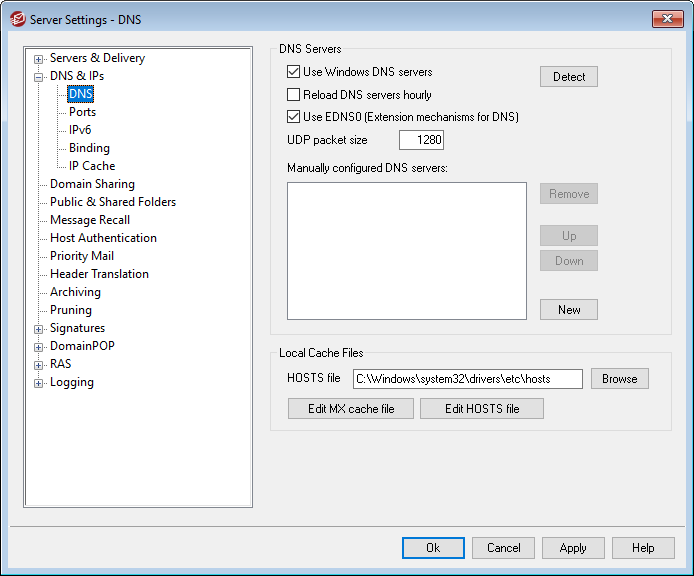
DNS Servers
Use Windows DNS servers
When this option is selected, MDaemon will use all DNS servers found within your Windows TCP/IP configuration. MDaemon will try each DNS server once per lookup operation and in sequence until it exhausts the complete list of DNS servers or finds the first one that works. If you include additional DNS servers in the Manually configured DNS Servers option below, MDaemon will try those servers as well. Finally, at startup the System log will display each DNS server and indicate its source (i.e. manually configured or taken from Windows).
Reload DNS server hourly
Check this box if you wish to reload the DNS server every hour. This is disabled by default.
Use EDNS0 (Extension Mechanisms for DNS)
By default MDaemon supports Extension Mechanisms for DNS (see RFC 2671). Clear this checkbox if you not wish to support it.
UDP packet size
This option controls the UDP packet size. The default size is 1280 bytes.
Manually configured DNS servers
MDaemon will use all DNS servers specified here when performing DNS lookups. MDaemon will try each server once per lookup operation and in sequence until it exhausts the complete list of DNS servers or finds the first one that works. If you enable the Use Windows DNS servers option above, MDaemon will also query all DNS servers found within your Windows TCP/IP configuration. Finally, at startup the System log will display each DNS server and indicate its source (i.e. manually configured or taken from Windows).
DNS Servers for DNS-BL and URIBL Lookups
Do not use a public DNS resolver, such as Google's 8.8.8.8 or Cloudflare's 1.1.1.1, for DNS Block List (DNS-BL) or URIBL lookups. Services such as Spamhaus and URIBL rate-limit or refuse queries that arrive through a public resolver, because a public resolver relays lookups from far more users than the service is designed to support. Spamhaus returns a 127.255.255.x error code instead of a real answer, and URIBL responds with a URIBL_BLOCKED result. Either response means the lookup never actually checked the address, so whatever DNS-BL or URIBL protection you have enabled is silently doing nothing, even though MDaemon reports no error.
To avoid this, configure the Manually configured DNS servers option above with a local caching DNS resolver that does not forward its queries to a public resolver, rather than pointing it at a public resolver directly. Alternatively, subscribe to the Data Query Service, a paid feed from Spamhaus designed for exactly this purpose, which is not subject to the public-resolver restriction.
Local Cache Files
Hosts file...
Before querying the DNS servers, MDaemon will first attempt to resolve an address by processing the Windows HOSTS file. If this file contains the IP address of the domain in question, MDaemon will not need to query the DNS server.
|
You must enter the complete path and filename rather than just the filename. MDaemon will attempt to use the following value as the default location of this file: [drive]:\windows\system32\drivers\etc\hosts The HOSTS file is a Windows file that contains the A-record or primary IP address for domain names. MDaemon also allows you to specify MX-record IP addresses within a file called MXCACHE.DAT. This file can be found within the MDaemon\APP\ folder. Click Edit MX cache file below and read the comments at the top of the file for more information. |

Edit MX cache file
Click this button to view or edit the MXCACHE.DAT file.
Edit hosts file
Click this button to view or edit the HOSTS file.
